# Datadog
> Point Rocketgraph at the Datadog you already have. Read-only, no agent, no migration — two keys and a query.
Rocketgraph reads logs from your existing Datadog account, reduces them to
patterns, and tells you when something has changed that shouldn't have.
Nothing is installed. Nothing is written back to Datadog. No migration, no
agent, no re-instrumentation — two credentials and a log query.
> **Note:** This is the **read** direction: Rocketgraph pulling from Datadog. If you want to
*send* telemetry to Rocketgraph instead, see
[Instrumentation](/instrumentation/node).
## What it does
Every few minutes it pulls one window of logs, groups them into templates, and
compares that window against its own recent history. When something has
materially moved — and only then — it asks a model what it means.
```
fetch ──► cluster ──► snapshot ──► delta ──►│gate│──► judge
Datadog patterns storage arithmetic AI
└─────────── runs every cycle ───────────┘ └─ only when something moved ─┘
```
Everything left of the gate is arithmetic: reproducible, explainable, and it
runs on every cycle. Everything right of it is a model that is **never called on
a healthy system**. That is a property of the design, not a setting.
---
## Step 1 — Create an API key
Go to **Organization Settings → API Keys**, or open
[app.datadoghq.com/organization-settings/api-keys](https://app.datadoghq.com/organization-settings/api-keys).
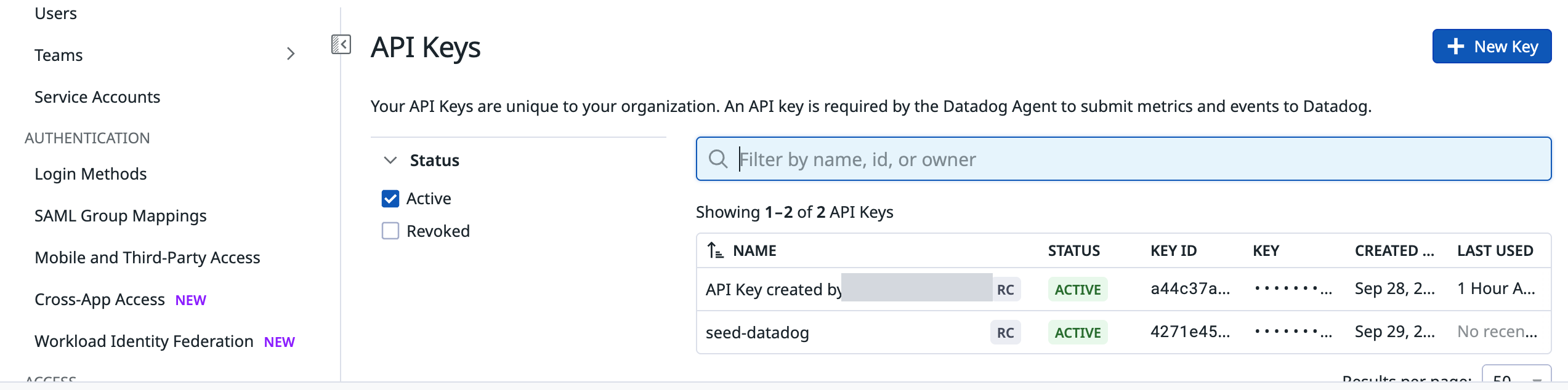 Click **+ New Key**, give it a name you will recognise later
(`rocketgraph-read` works), and copy the value. Datadog shows it once.
This key identifies your organisation. Rocketgraph uses it on read calls only —
it never submits data.
---
## Step 2 — Create an application key, and scope it
This is the credential that actually grants access, and the one worth getting
right.
Go to **Organization Settings → Application Keys**, or open
[app.datadoghq.com/organization-settings/application-keys](https://app.datadoghq.com/organization-settings/application-keys).
Click **+ New Key**, then set its scopes:
| Scope | Why |
| --- | --- |
| `logs_read_data` | read log events |
| `logs_read_index_data` | read the aggregate counts |
Nothing else.
> **Warning:** **Do not leave the application key unscoped.** An unscoped key can read *and
write* your monitors, dashboards, SLOs, incidents, users and billing.
Rocketgraph needs to read logs, so grant exactly that.
An application key also inherits the permissions of the user who creates it —
so create it as a user with log read access, not as an administrator.
> **Note:** **Why two keys, and why only one can be scoped.** The API key belongs to the
organisation and is what submits data, so it cannot be restricted. The
application key belongs to a *user* and is what authorises API reads, which is
why it supports scopes. If your security reviewer asks one question about this
integration, it will be this one.
---
## Step 3 — Choose what to watch
Rocketgraph takes a Datadog log query — the same syntax as the Logs Explorer
search bar.
| Query | Watches |
| --- | --- |
| `*` | everything. A good first run — it shows you what your estate actually looks like |
| `status:(error OR warn)` | the usual choice: less volume, higher signal |
| `service:checkout` | one service |
| `env:prod -service:health-check` | exclude known noise |
> **Warning:** **Pick one query and stay with it.** Snapshots are only ever compared against
others taken with the *same* query. A window over `status:error` and a window
over `*` are not comparable — differencing them would report every info-level
template as brand new. Changing the query starts a fresh baseline.
---
## Step 4 — Connect it
In Rocketgraph, go to **Datasources → Datadog** and paste all three values.
Click **+ New Key**, give it a name you will recognise later
(`rocketgraph-read` works), and copy the value. Datadog shows it once.
This key identifies your organisation. Rocketgraph uses it on read calls only —
it never submits data.
---
## Step 2 — Create an application key, and scope it
This is the credential that actually grants access, and the one worth getting
right.
Go to **Organization Settings → Application Keys**, or open
[app.datadoghq.com/organization-settings/application-keys](https://app.datadoghq.com/organization-settings/application-keys).
Click **+ New Key**, then set its scopes:
| Scope | Why |
| --- | --- |
| `logs_read_data` | read log events |
| `logs_read_index_data` | read the aggregate counts |
Nothing else.
> **Warning:** **Do not leave the application key unscoped.** An unscoped key can read *and
write* your monitors, dashboards, SLOs, incidents, users and billing.
Rocketgraph needs to read logs, so grant exactly that.
An application key also inherits the permissions of the user who creates it —
so create it as a user with log read access, not as an administrator.
> **Note:** **Why two keys, and why only one can be scoped.** The API key belongs to the
organisation and is what submits data, so it cannot be restricted. The
application key belongs to a *user* and is what authorises API reads, which is
why it supports scopes. If your security reviewer asks one question about this
integration, it will be this one.
---
## Step 3 — Choose what to watch
Rocketgraph takes a Datadog log query — the same syntax as the Logs Explorer
search bar.
| Query | Watches |
| --- | --- |
| `*` | everything. A good first run — it shows you what your estate actually looks like |
| `status:(error OR warn)` | the usual choice: less volume, higher signal |
| `service:checkout` | one service |
| `env:prod -service:health-check` | exclude known noise |
> **Warning:** **Pick one query and stay with it.** Snapshots are only ever compared against
others taken with the *same* query. A window over `status:error` and a window
over `*` are not comparable — differencing them would report every info-level
template as brand new. Changing the query starts a fresh baseline.
---
## Step 4 — Connect it
In Rocketgraph, go to **Datasources → Datadog** and paste all three values.
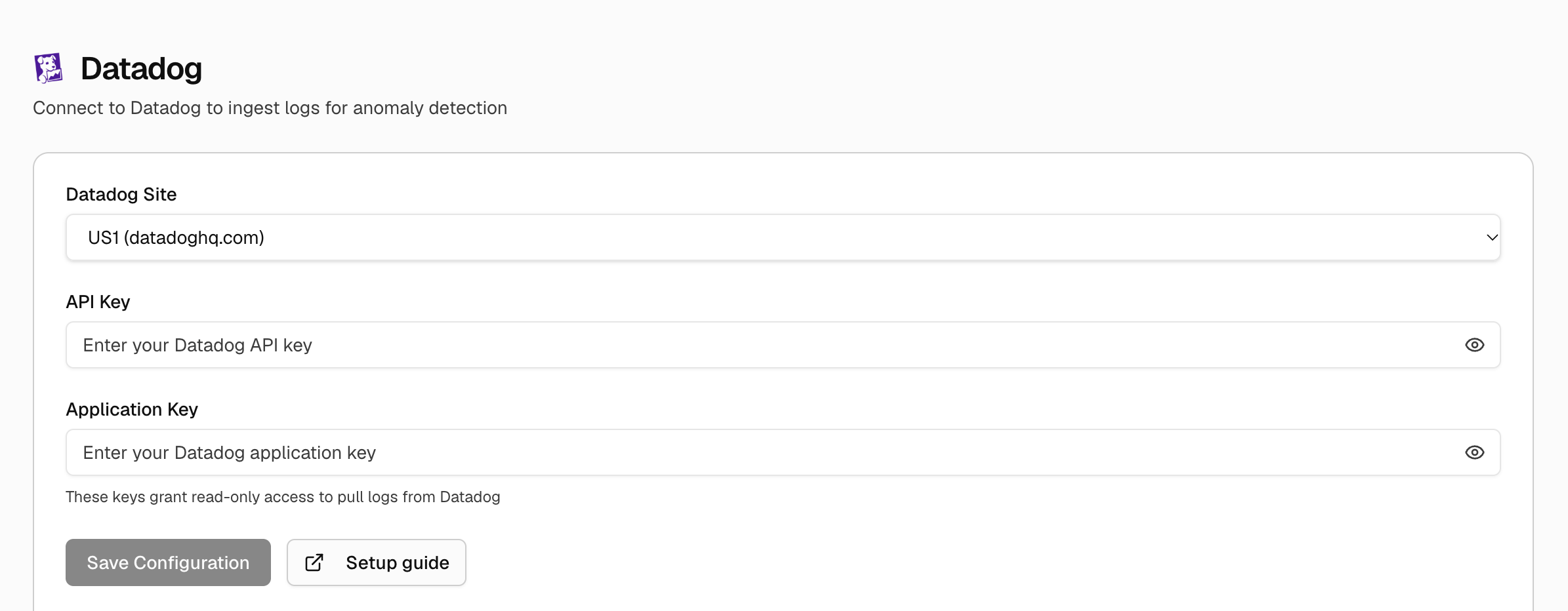 | Field | Value |
| --- | --- |
| Site | `datadoghq.com`, `datadoghq.eu`, `us3.datadoghq.com`, `ap1.datadoghq.com` … |
| API Key | from step 1 |
| Application Key | from step 2 |
> **Warning:** Get the **site** right. `datadoghq.eu` and `datadoghq.com` are separate
deployments and keys are not portable between them. A mismatch produces a 403
that reads exactly like a bad key.
---
## What it looks for
| Kind | Meaning | Why it matters |
| --- | --- | --- |
| **New** | a template absent from every baseline window | the strongest signal logs can give — a line your system has never emitted usually means a code path that has never run |
| **Spike** | improbably high against its own history | measured with a Poisson tail, not a z-score: at low rates a normal approximation calls 3 → 6 alarming, and it isn't |
| **Drop** | went quiet when the baseline says it shouldn't | **this is what silent failures look like.** The thing that logged success stopped speaking, and nothing else catches that |
| **Volume** | the window total moved | usually traffic, a deploy or a batch job — and it will say so |
### A real result
Six baseline windows on a steady system, then a fault appears:
```
04:08 window 03:42-03:47 100 logs, 12 patterns no material change — no model call
04:08 window 03:47-03:52 100 logs, 12 patterns no material change — no model call
04:10 window 04:04-04:09 250 logs, 13 patterns, baseline 6
NEW 37x [checkout] connection pool exhausted: waited 30000ms
for a free connection (active=
NEW 15x [payments] charge declined merchant=m_northwind
code=issuer_rejected_bin
VOLUME 250 (~99, 2.5x) (window total)
SPIKE 112 (~9, 12.9x) [payments] charge declined <*> code=issuer_rejected_bin
```
Two details in that output explain how the grouping works:
`active=200` became `active=`. Masking high-cardinality values is what
makes a template stable — without it, every line with a different number would
be its own pattern and nothing would ever group.
`merchant=m_northwind` was **not** masked, so it split into its own template.
That is correct: the literal recurs often enough to be a real pattern, and it is
exactly how a single bad merchant surfaces as a distinct signal instead of being
averaged into the rest.
And note the quiet windows say **no model call**. Nothing moved, so nothing was
asked.
---
## First run is silent
On a cold start every template is technically new, which is true and useless.
Rocketgraph reports nothing until it has history to compare against — typically
six windows, so roughly half an hour at a five-minute cadence.
After a deploy you will briefly see a burst of **New** templates. That is
correct: new code emits new log lines. It settles once they are in the baseline.
---
## Troubleshooting
Snapshots are scoped by query text. If the query is changing between runs — a
shell variable, a trailing space, a different quoting — every run starts fresh.
Check they match exactly.
The window is probably ending at *now*. Log intake is not instantaneous, so the
most recent minute is always under-counted and reads as a fall. Rocketgraph ends
its window 60 seconds back for exactly this reason.
Almost always the site rather than the key. Check whether your organisation is
on `datadoghq.com`, `datadoghq.eu`, or one of the US3/US5/AP1 deployments — the
site is shown in the top-right of Organization Settings.
Check the query. `status:error` on an estate that logs errors at `warn` will
match nothing. Run with `*` once to see what is actually there.
---
## What Rocketgraph does not do
- **It does not write to Datadog.** No monitors created, no tags added, nothing modified.
- **It does not need an agent.** No install on your hosts.
- **It does not require migration.** Keep sending to Datadog exactly as you do now.
- **It does not call a model unless something changed.** A healthy system costs nothing to watch.
| Field | Value |
| --- | --- |
| Site | `datadoghq.com`, `datadoghq.eu`, `us3.datadoghq.com`, `ap1.datadoghq.com` … |
| API Key | from step 1 |
| Application Key | from step 2 |
> **Warning:** Get the **site** right. `datadoghq.eu` and `datadoghq.com` are separate
deployments and keys are not portable between them. A mismatch produces a 403
that reads exactly like a bad key.
---
## What it looks for
| Kind | Meaning | Why it matters |
| --- | --- | --- |
| **New** | a template absent from every baseline window | the strongest signal logs can give — a line your system has never emitted usually means a code path that has never run |
| **Spike** | improbably high against its own history | measured with a Poisson tail, not a z-score: at low rates a normal approximation calls 3 → 6 alarming, and it isn't |
| **Drop** | went quiet when the baseline says it shouldn't | **this is what silent failures look like.** The thing that logged success stopped speaking, and nothing else catches that |
| **Volume** | the window total moved | usually traffic, a deploy or a batch job — and it will say so |
### A real result
Six baseline windows on a steady system, then a fault appears:
```
04:08 window 03:42-03:47 100 logs, 12 patterns no material change — no model call
04:08 window 03:47-03:52 100 logs, 12 patterns no material change — no model call
04:10 window 04:04-04:09 250 logs, 13 patterns, baseline 6
NEW 37x [checkout] connection pool exhausted: waited 30000ms
for a free connection (active=
NEW 15x [payments] charge declined merchant=m_northwind
code=issuer_rejected_bin
VOLUME 250 (~99, 2.5x) (window total)
SPIKE 112 (~9, 12.9x) [payments] charge declined <*> code=issuer_rejected_bin
```
Two details in that output explain how the grouping works:
`active=200` became `active=`. Masking high-cardinality values is what
makes a template stable — without it, every line with a different number would
be its own pattern and nothing would ever group.
`merchant=m_northwind` was **not** masked, so it split into its own template.
That is correct: the literal recurs often enough to be a real pattern, and it is
exactly how a single bad merchant surfaces as a distinct signal instead of being
averaged into the rest.
And note the quiet windows say **no model call**. Nothing moved, so nothing was
asked.
---
## First run is silent
On a cold start every template is technically new, which is true and useless.
Rocketgraph reports nothing until it has history to compare against — typically
six windows, so roughly half an hour at a five-minute cadence.
After a deploy you will briefly see a burst of **New** templates. That is
correct: new code emits new log lines. It settles once they are in the baseline.
---
## Troubleshooting
Snapshots are scoped by query text. If the query is changing between runs — a
shell variable, a trailing space, a different quoting — every run starts fresh.
Check they match exactly.
The window is probably ending at *now*. Log intake is not instantaneous, so the
most recent minute is always under-counted and reads as a fall. Rocketgraph ends
its window 60 seconds back for exactly this reason.
Almost always the site rather than the key. Check whether your organisation is
on `datadoghq.com`, `datadoghq.eu`, or one of the US3/US5/AP1 deployments — the
site is shown in the top-right of Organization Settings.
Check the query. `status:error` on an estate that logs errors at `warn` will
match nothing. Run with `*` once to see what is actually there.
---
## What Rocketgraph does not do
- **It does not write to Datadog.** No monitors created, no tags added, nothing modified.
- **It does not need an agent.** No install on your hosts.
- **It does not require migration.** Keep sending to Datadog exactly as you do now.
- **It does not call a model unless something changed.** A healthy system costs nothing to watch.